WordPress keeps no record of plugin changes
Activating or deactivating a plugin changes a single option in the database (active_plugins) and fires a couple of hooks. Nothing about the event is stored: not the user, not the time, not the plugin name. When you open the Plugins screen the next morning, you see the current state and nothing else. If four people have administrator access — or one deploy script does — every one of them can plausibly say "it wasn't me".
This matters more than most changes, because a deactivated plugin usually fails silently. A page-cache plugin going off does not break the site; it just makes every page slower until someone notices the numbers. A security plugin going off does not show an error; it just stops watching. By the time you feel the symptom, the change can be days old.
What you can reconstruct after the fact
If it has already happened and no activity log was installed, your options are thin, but not zero:
- Server access logs. A deactivation from the admin screen is a POST to wp-admin/plugins.php. Grep your access log for that URL around the time behaviour changed. You will get an IP address and a timestamp — but not a username, and not which plugin was toggled.
- Login timing. Some hosts keep authentication logs. Cross-referencing who was logged in around the POST narrows the list of suspects.
- Deploy and maintenance tooling. Check the history of anything with site access: management dashboards, CI pipelines, "one-click" host optimisers. A surprising number of plugin flips are made by software, not people.
All of this is forensics with half the evidence missing. It answers "roughly when, possibly from where" — never "who, and what exactly".
When a plugin deactivates "by itself"
Before suspecting a colleague, rule out the causes that involve no human at all — they account for a surprising share of "who did this?" mysteries:
- A failed update left the files missing. If a plugin's main file is gone — a half-finished update, a deploy that skipped a folder, an overzealous cleanup — WordPress silently drops it from the active list the next time the list is checked, and shows "the plugin has been deactivated due to an error: plugin file does not exist". This pruning uses WordPress's silent deactivation mode, so it fires none of the usual hooks.
- A fatal error paused it. Since WordPress 5.2, a plugin that crashes the site can be put into a recovery-mode pause — the "your site is experiencing a technical issue" email — which looks deactivated at a glance but is a different state.
- Your host or security tooling did it. Managed hosts switch off plugins they know to be incompatible around PHP and core upgrades, and malware cleanups deactivate anything suspicious.
- A backup restore rewound the list. Restoring a database backup restores active_plugins too — every plugin activated since that backup is now "mysteriously" off.
An activity log settles it from either direction. A genuine deactivation is a recorded event with a named actor; if the log shows no deactivation event at the time it happened — or shows a core or plugin update immediately before — the absence of a receipt is itself the answer, and it points at the mechanical causes above rather than at a person.
What the answer looks like with an activity log in place
Who Changed It records the full plugins family — activated, deactivated, installed, updated, deleted — each record naming the actor, their role, IP and session. A deactivation made by a deploy script, WP-CLI or cron carries no logged-in user, and the record says so — which separates your automation from your colleagues without any guesswork. So the row you are looking for reads like a receipt:
#40911 · 14:07 · no user · plugin_deactivated · WP Rocket — no logged-in user behind the request, new IP — flagged strange
Because every event is scored against the actor's own baseline, a deactivation that does not fit — wrong hour, wrong actor, a new IP — is flagged amber or red and surfaces at the top instead of drowning in routine noise, with the reason for the escalation written out in plain words. Dangerous events email you the moment they happen. You can try the whole screen in the live demo on the homepage, running on sample data.
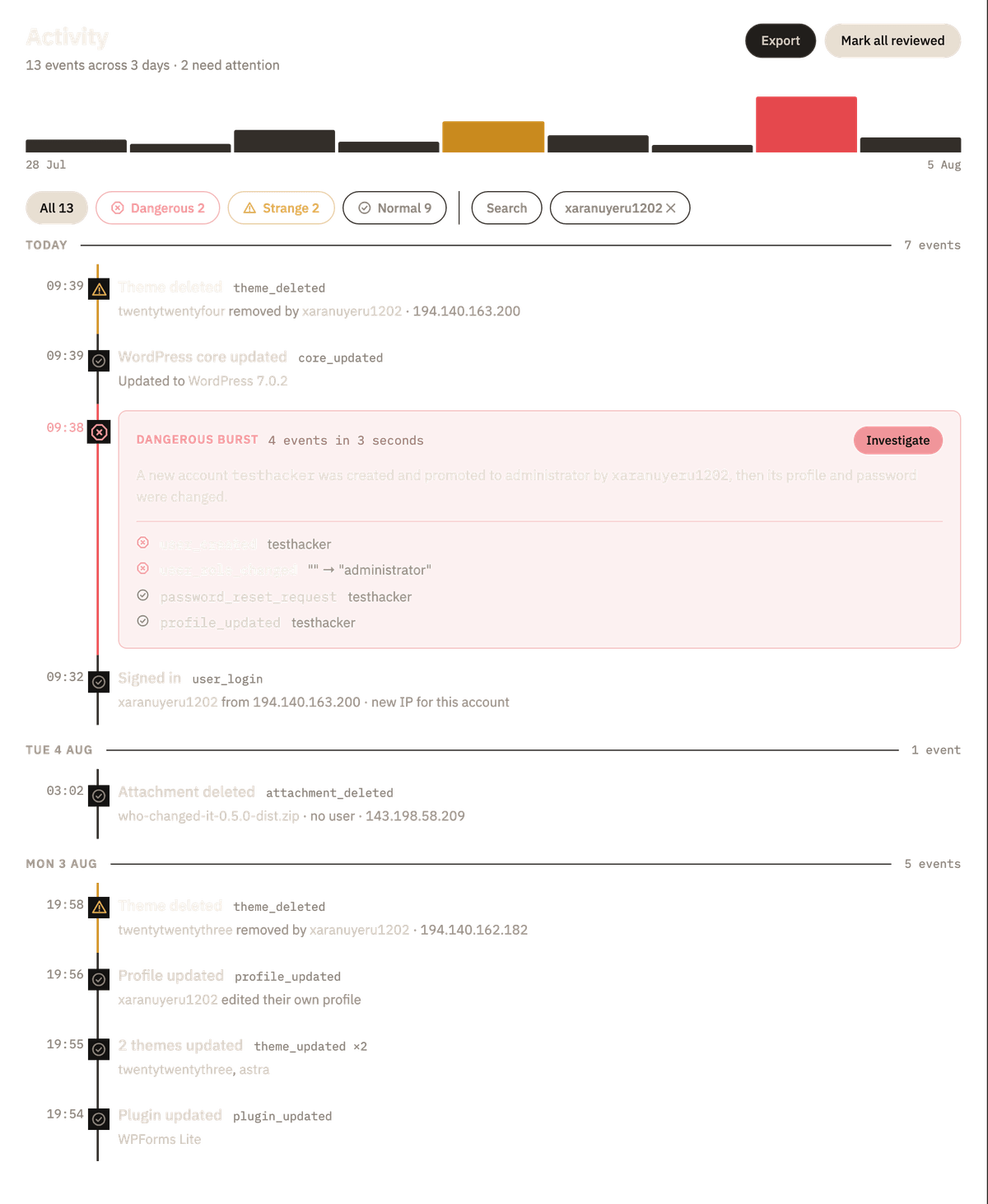
Who installed that plugin?
The reverse question deserves the same receipt. A plugin nobody recognises appearing in the list is a classic sign of either a compromised account or a colleague "just trying something" — and WordPress is exactly as silent about installs as it is about deactivations. In the log, plugin_installed starts at strange rather than normal, because on most sites installing a plugin is a rare, deliberate act; an install outside the actor's usual hours or from an IP never seen for that account escalates further, and an install followed a minute later by activation reads as one story in the timeline, not two disconnected rows. The event reference lists the whole family with its base severities.
If the receipt points at the first explanation rather than the second — an install nobody can account for, an administrator account created minutes earlier, a file change alongside it — the log has done its job and the next step is no longer logging. That is incident work: finding what else was left behind, and closing the way in. A first look at the files is free: scan the site over SSH with WPSniffer, the author's open-source malware scanner, starting with that plugin's folder and wp-content/uploads. Malware removal and hardening is the service side of this site’s own author, if you would rather not do it yourself.