What WordPress doesn't tell you
There is no native login history in WordPress. The Users screen shows who exists, not who signed in, from where, or how many times somebody tried and failed first. Role changes leave no trace. Account creation leaves nothing but the account. So the routine incident-response questions — has this account ever logged in from that country before? who created this editor? did the attack that hammered the login page ever succeed? — are unanswerable on a stock install.
How to see login history without a plugin
Worth saying plainly, because the search results rarely do: there is no way to see a WordPress login history without something having recorded it first. Core keeps no such table. If the sign-in you care about already happened and nothing was watching, these are the leftovers to try, in order of how often they actually help:
- Your host's own authentication log. Managed WordPress hosts frequently log wp-admin sign-ins separately from the application, in a panel of their own. This is the only one of these that names accounts, so try it first.
- The server access log. A sign-in is a POST to wp-login.php; a successful one is usually followed by requests to wp-admin from the same IP, a failed one by another POST to the same URL. You get IPs and timestamps, never usernames — and on a busy site the bot traffic dwarfs the human traffic.
- Currently active sessions. WordPress stores a session token per logged-in user, so you can see who is signed in now — including from a device you do not recognise — but nothing about last week. Changing that user's password invalidates their other sessions.
- Security plugins you already run. If a firewall plugin is installed it may have kept its own login record, usually on a short window and its own screen, separate from anything else that happened on the site.
All of this is reconstruction with most of the evidence missing. It answers "an IP tried something around then" — not "this account signed in, from a country it has never used, and here is what it changed next".
What an authentication trail records
Who Changed It logs the full authentication family alongside everything else on the site — the same timeline, so a sign-in and what that person did next sit next to each other:
- Successful logins and logouts — the user, their role, the IP and the session.
- Failed attempts — which username was targeted and from which IP. Each attempt is its own record, and once five arrive from one IP inside fifteen minutes the run is escalated as a brute-force attempt with the count written into the reason.
- New users, deletions and role changes — who created the account, who promoted it, and when. A subscriber quietly becoming an administrator is one of the strongest compromise signals there is.
- Password resets, reset requests and profile edits — including the email-address change that usually precedes an account takeover.
The event reference lists the whole authentication family with the severity each event starts at.
What a brute-force burst actually looks like in the log
A failed login is not treated as routine: it starts at strange, because on a small site with three known editors even one is worth a glance. What changes the picture is volume from a single source. Five failures from the same IP inside a fifteen-minute window escalate the event to dangerous, and the record says why in plain words rather than making you count rows:
#40890 · 03:12 · login_failed · "admin" · 91.219.###.### — 6 failed login attempts from this IP within 15 minutes (possible brute force) — dangerous
Being honest about the mechanics: ninety attempts are still ninety records, because each one is a real event with its own timestamp and target — that is what makes the log usable as evidence afterwards. What does not multiply is the interruption. Alerts are throttled per event type, fifteen minutes by default, so a sustained burst reaches you as one message rather than ninety, and the attempts stay in the log for when you go looking.
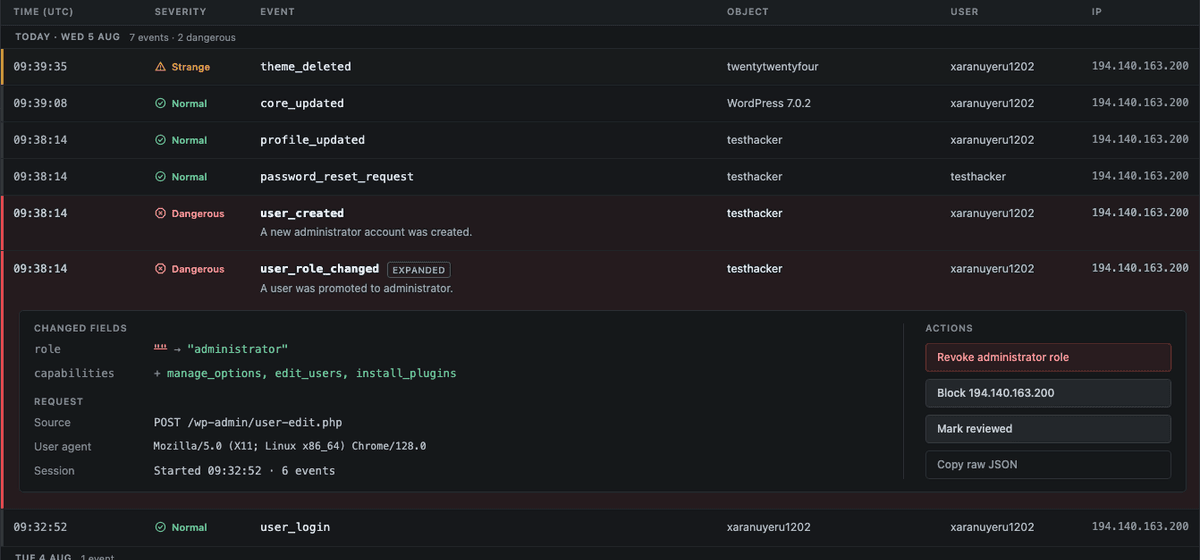
Separating background noise from the one row that matters
Every public WordPress site gets probed constantly; a raw login log is mostly noise. The useful signal is deviation, and that is what the behaviour scoring works on: a successful sign-in is compared against that account's own history, so a login at an hour that account never uses, or from an IP it has never used, is escalated on the spot. A successful login for a dormant account, at night, from an address never seen for that user, followed by a plugin install, goes red — and the sequence is exactly what you see when you open the row, because logins live in the same timeline as content, plugin and settings events. Every escalation stores the reason it was raised, in plain words — see the demo for the screen itself.
Getting told the moment it happens
A log you have to remember to open is a log you read after the damage. Dangerous events are pushed out as they are recorded: by email to your admin address out of the box, to as many recipients as you like, and — since version 0.8.0 — natively to Slack, Discord or Telegram. Each channel stays completely inert until you save a destination for it, so a default install still makes no outbound requests at all. You choose what clears the bar: dangerous only, dangerous and strange, or everything. Several events in one request arrive as a single grouped message rather than a pile, and the per-event-type throttle keeps a burst to one notification. The notifications guide has the setup for each channel.
Prevention still belongs to your security plugin
An audit log is deliberately not a firewall. It does not rate-limit, block IPs or challenge bots — tools like Wordfence and its peers do that well, in the request path, where blocking has to happen. The same goes for the limit-login-attempts family of plugins: they exist to lock an attacker out after N tries, and they keep a short record of the attempts they blocked, scoped to the login form and usually pruned quickly. That is a different job from an audit trail, which keeps every authentication event next to every content, plugin and settings change on a retention window you choose, so you can answer what happened after a successful sign-in. Run both: the firewall to keep most attacks out, the log to tell you with certainty what happened when something got through, and to cover the threat a firewall cannot see — the credentialed insider whose login looks perfectly legitimate.
And when the trail shows that someone did get in — a successful sign-in after a burst of failures, from an address that account has never used — neither tool is the right one any more. Rotating the password is not containment on its own; what matters is what was changed while they were inside, and what they left behind. This site's author does that work independently as WP Server Guard: compromise cleanup, WordPress security audits and Linux web-server hardening, so a leaked credential stops being a recurring event.