Recording · WordPress 7.0 ready

Somebody changed something.

Now you know exactly who, when, and what.

Who Changed It is a free activity log and audit trail plugin for WordPress. It records every action on your site — field-level post diffs, logins, plugin flips, settings and file changes, orders, new users — and classifies every one of them normal, strange or dangerous, with the reason written out. Fast, light, and CSV export is never paywalled. AI-assisted analysis of your log is what we are building next.

GPLv2 · No account required · No external services

01 / Light
One indexed table, written only when something changes.
02 / Classified
Every event scored normal, strange or dangerous — with the reason.
03 / Open
CSV & JSON export in the free plugin. Always.
Live demo

Poke at the real thing.

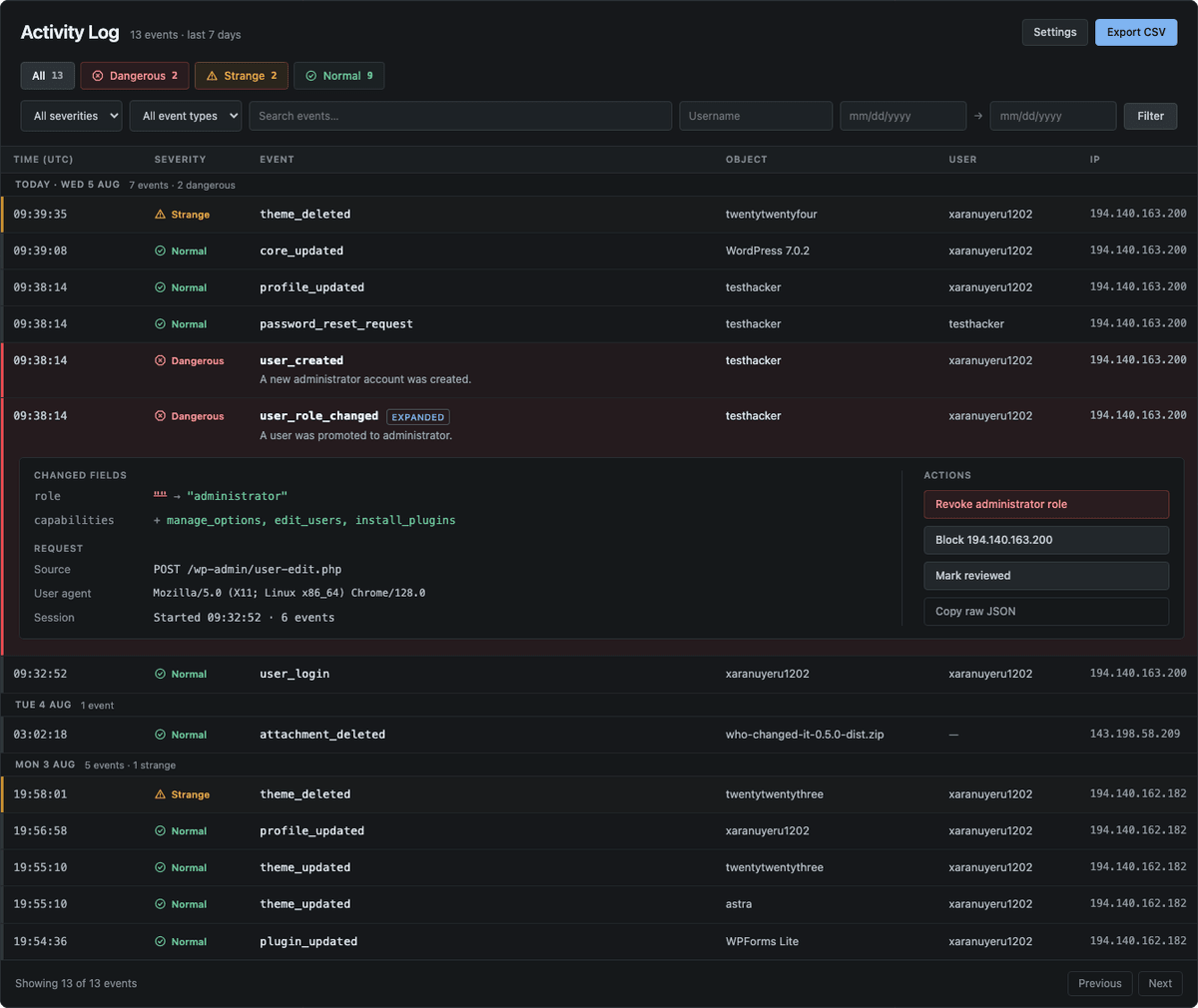
This is the plugin's screen, running on sample data. Every row is scored against the actor's own baseline — normal, unusual, dangerous. Filter it, or open a row for the diff and the reasoning. The Ask AI tab previews a feature still in development — everything else here ships today.

example.com/wp-admin/admin.php?page=who-changed-it

Activity Log

Behaviour
↓ CSV ↓ JSON

Sample data. Your log stays on your server.

The Who Changed It activity log screen in wp-admin: severity count chips, filters and search, with a dangerous user_role_changed record expanded to show the field-level diff of a user promoted to administrator.
The shipped plugin, not a mockup: the Activity Log screen with a dangerous event expanded — the diff, the request source and the plain-language reason.
Event taxonomy

Everything that moves gets a receipt.

Around 90 event types out of the box, grouped into eight families. Third-party plugins can register their own with a single hook.

Three minutes to a full audit trail.

01
Install and activate
One click from the WordPress directory. The recorder starts on activation — no setup wizard, no API key, no external service.
02
Let it watch
Every hook that changes state is captured as it happens, and pages that change nothing are never touched. Retention, IP privacy and who may read the log are yours to set.
03
Ask what happened
Filter the timeline by severity, type, user or date, open a record to read the field-level diff, and let the dangerous events email you the moment they happen.

Built for the person who has to explain what happened.

Free plugin · no feature held hostage

Performance
Lighter than the thing you use now
One insert into one indexed table, and only when something actually changed. A page view that changes nothing does no extra work at all: no queries, no autoloaded option bloat, no cron pileup.
Diffs
Field-level before / after
Not "post updated". You see the title, the block, the meta key, the option value — old on the left, new on the right, so the previous value is always readable.
Behaviour
Normal, unusual or dangerous
Every event is scored against each actor's own baseline — hours, frequency, role, IP — and flagged green, amber or red, so the two rows that matter surface out of four hundred.
AI analysis · in development
Ask the log a question
Plain-language questions over your own log, answered with citations to the exact records. This one is not in the released plugin yet — it is next on the roadmap, and the demo above shows where it is going.
Export
CSV and JSON, not paywalled
Full export in the free plugin, including scheduled email digests and a REST endpoint for your own dashboards.
Notifications
Told the moment it matters — email today, Slack and Discord via one hook
Dangerous events reach you the second they are recorded, with the escalation reason in the message body. Email ships on by default; Slack, Discord and Telegram are built in — paste a destination, pick what clears the bar, send a test. A quiet period keeps a brute-force burst to one message rather than hundreds, and several events in one request arrive grouped. Setup for each channel is in the notifications guide.
Attribution
Humans, bots and cron, separated
Every record names the actor, role, IP, session and origin — WP-CLI, REST, cron, admin or automation — so "it wasn't me" is checkable.
Security & compliance

The log is evidence. Treat it like evidence.

Records are append-only and hash-chained, so tampering is detectable. Retention, redaction and export are yours to configure — nothing leaves your server unless you send it.

Read how the hash chain works →
A01
Append-only, hash-chained
Each record hashes the previous one. Deleted or altered rows break the chain and get flagged.
A02
Stays on your server
No telemetry, no third-party log store, no external calls at all. The AI analysis in development will be opt-in and will run on a provider you configure.
A03
Retention and redaction
Set per-family retention windows; mask IPs or personal fields to satisfy GDPR requests.
A04
Scoped access
Reading the log is its own capability (whochita_view_log), grantable per role — including a mode where administrators have no access unless it is granted.
A05
Evidence you can hand over
Export a signed, time-bounded record set as CSV or JSON for auditors and incident reports.

From people who found the culprit.

Free on WordPress.org · GPLv2

"A client swore they never touched the checkout page. The diff showed the exact block, the exact minute, and the exact person. That conversation lasted eight seconds."

"We replaced a log plugin that added 400ms to every admin page. This one we cannot feel, and it tells us more."

"Our auditor asked for six months of change history in a readable format. Two clicks, one CSV, no upsell screen."

Who builds it

Written by the person who gets called in afterwards.

Who Changed It is built and maintained by G. Schad, an independent WordPress and Linux web-server security specialist working as WP Server Guard — nine years of WordPress security audits, malware remediation and server hardening, across more than two hundred engagements.

The plugin exists because incident work kept hitting the same wall. By the time anyone calls, the site itself remembers almost nothing: no record of which plugin was switched off before things broke, which account signed in from where, or what the settings looked like last week. Reconstructing that from backups and access logs is slow, expensive and often inconclusive — so the useful thing is to have been recording all along. That is the whole design brief, and it is why the evidence side of the plugin (hash chain, exports, scoped access) got as much attention as the timeline.

Need the human version — a site audited, a compromise cleaned up, a host hardened? That is what WP Server Guard does. The plugin stays free, self-hosted and unrelated to it either way.
Questions, answered plainly.